




Midnight’s pre-patch 12.0 is the calm before the eclipse — the moment Azeroth stops feeling like “this season” and starts feeling like the next WoW era. It’s where the game quietly rewires itself: systems get shaved down to clean edges, interfaces learn new tricks, old habits get punished, and new muscle memory gets rewarded. If an expansion launch is a door being kicked open, the pre-patch is the sound of the lock turning: class kits tighten, numbers shift, collections and cosmetics get modernized, and the world begins dropping hints that something vast is about to step out of the dark.
In this Midnight Pre-Patch guide, we’ll cut through what matters and what’s noise — a clean, readable breakdown of the changes that actually affect how the game plays and feels. You’ll get the key system shifts in plain language (class pruning and tuning pressure points, number/gear scaling quirks, transmog and collection rules, UI/tooling updates and more) plus the practical “so what?” that tells you why each change is worth your attention.
The Midnight pre-expansion patch arrives on January 20, 2026 (January 21 in EU). The update lays the groundwork for World of Warcraft Midnight (the second chapter of the Worldsoul Saga, if you forgot) ahead of the expansion’s global release on March 2, 2026.
3 days before Midnight launch, an Early Access period begins for those who pre-ordered an Epic Edition of the expansion.
The pre-patch itself is split into phases: core systems and class changes go live first, while the Twilight Ascension in-game event kicks off the week of January 27. During this event window, the Winds of Mysterious Fortune buff will grant +X% bonus experience for levels 10–79 to help level your alts. In short, January 20 marks the dawn of Midnight, giving players time to prepare before the expansion proper begins.
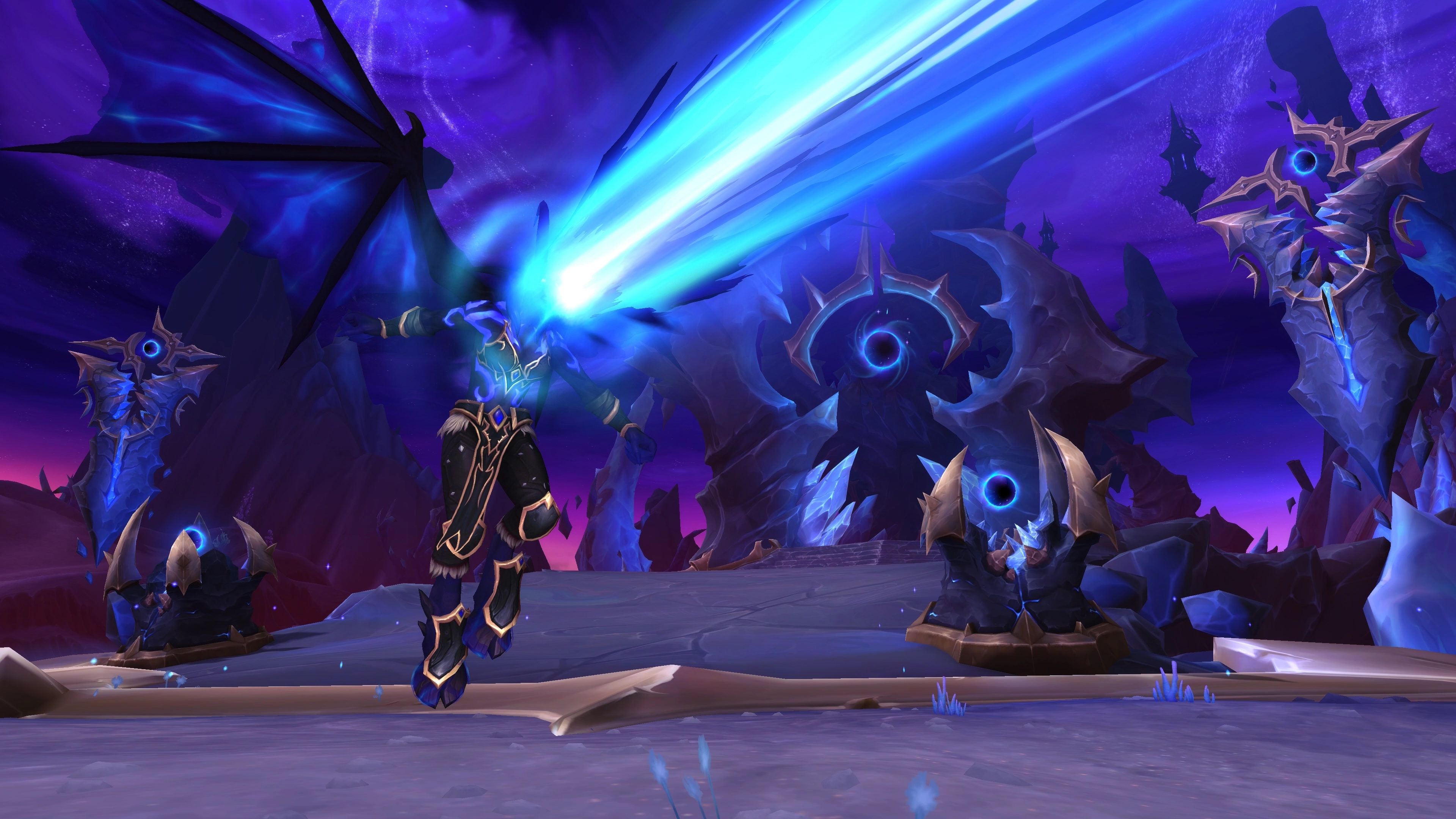
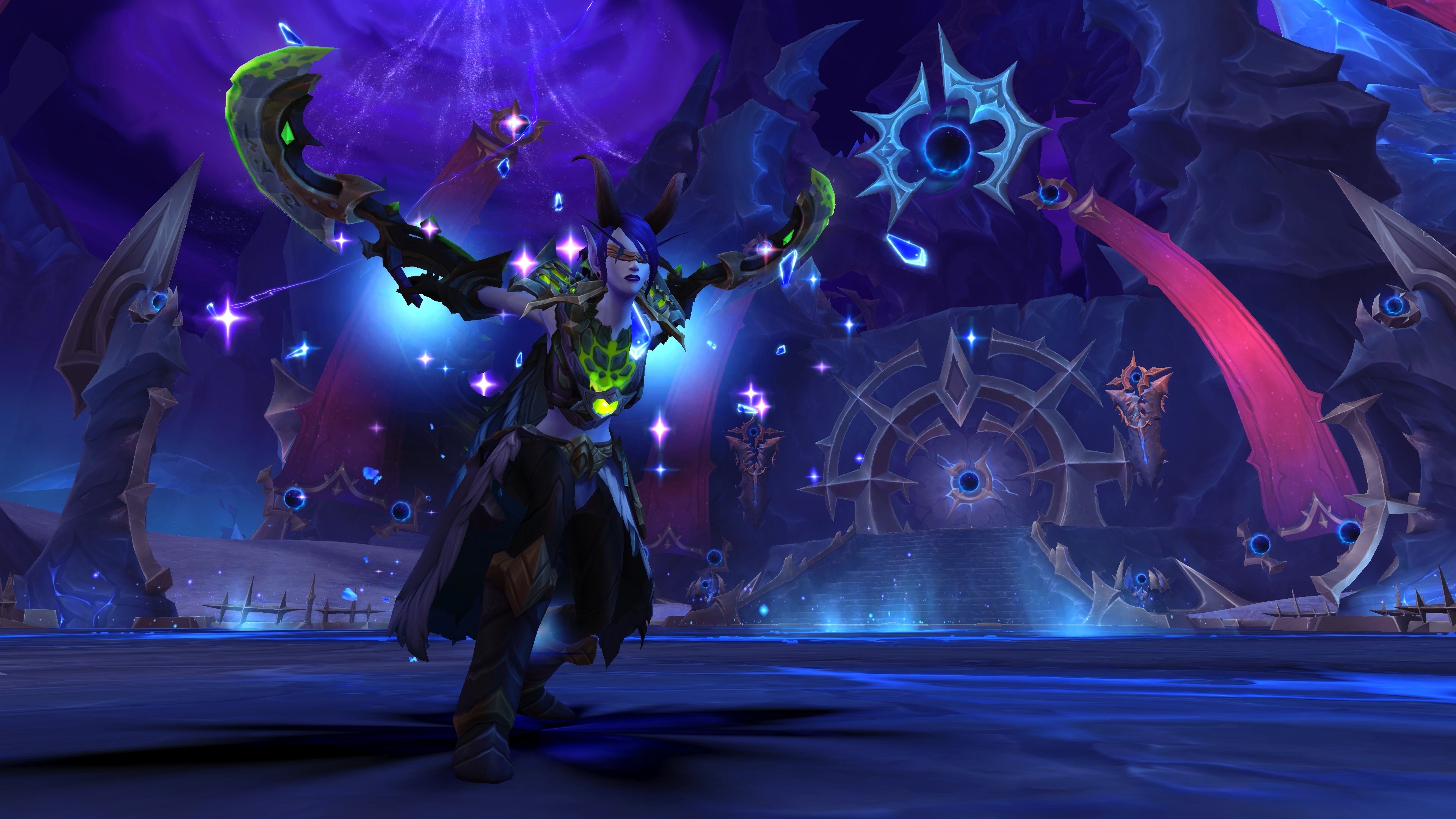
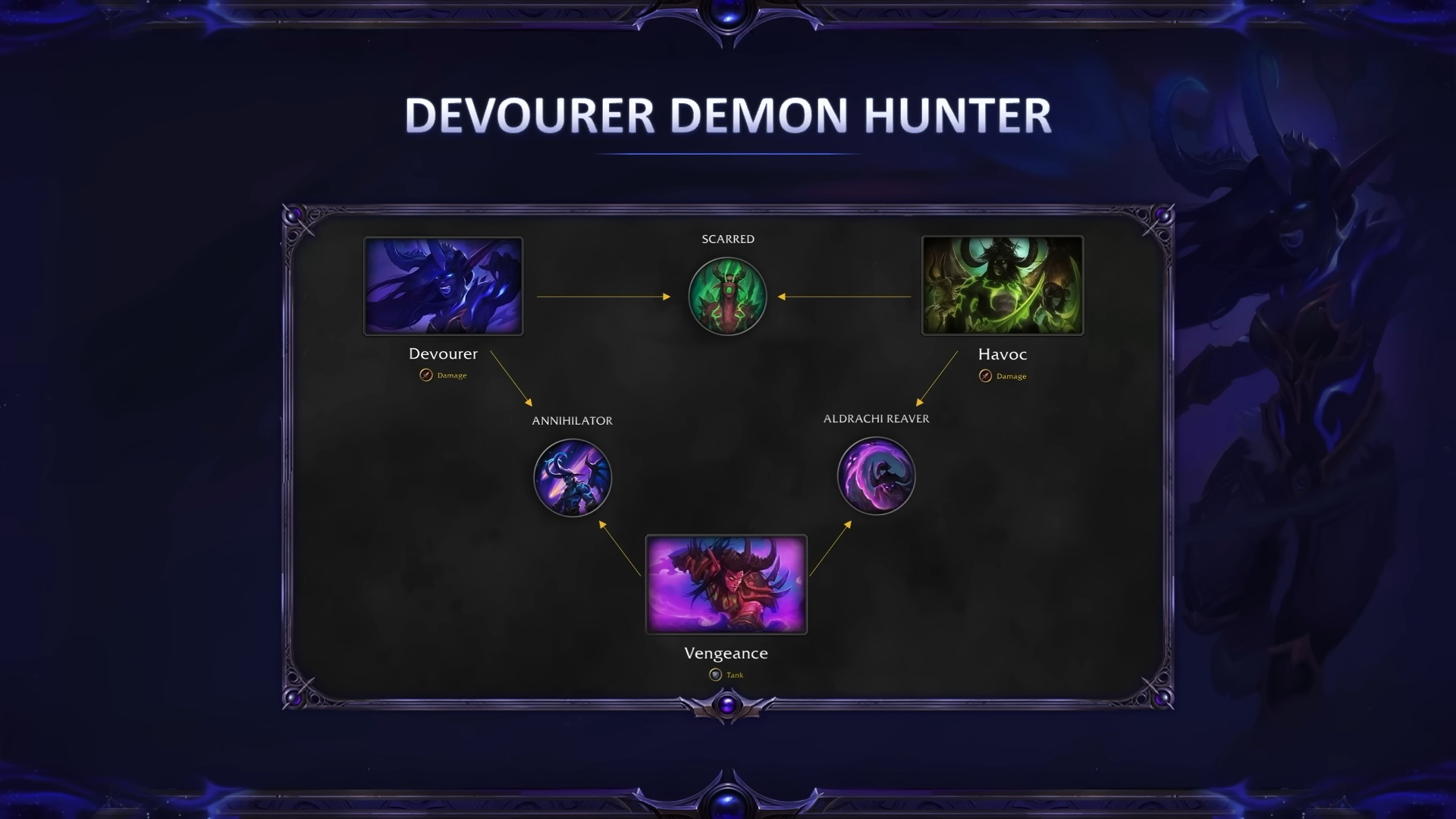
Demon Hunters receive a major update in the Midnight pre-patch: a brand new third specialization, Devourer. This mid-range DPS spec wields void energies instead of fel, fighting from 20–25 yards with glaives and forbidden cosmic power. Devourer is described as a “soul-harvesting, planet-crushing spellcaster” with all the mobility of a DH, able to dart into melee for devastating combo attacks.
In gameplay terms, Devourer has an array of void-themed abilities — like the Void Metamorphosis (a void-powered demon form), Reap (scythe attack consuming souls), and Collapsing Star (a heavy finisher) — all animated with eerie purple effects. To support the new spec, Demon Hunters gain a fresh Hero talent tree “Annihilator,” shared by Devourer and Vengeance specs. Devourers also use the existing Scarred Hero (formerly Fel Scarred) talent tree, with new nodes tailored for void powers.
Alongside the new spec, Void Elf Demon Hunters become available. For the first time, Void Elves (Alliance) can embrace the Illidari tradition — fittingly, as their void affinity aligns with the Devourer’s theme. Unlocking a Void Elf DH requires completing a short introduction questline (one-time per account) once the pre-patch goes live. After that, you can create a Void Elf Demon Hunter just as you would a Blood Elf or Night Elf. (Notably, no new Demon Hunter options were added for other races at this time — e.g. Nightborne are not yet available as Demon Hunters.)
Between the Devourer spec and the new race combo, Havoc and Vengeance players have a lot of new toys to play with — and lore enthusiasts get a unique twist on the class they’ve mastered.
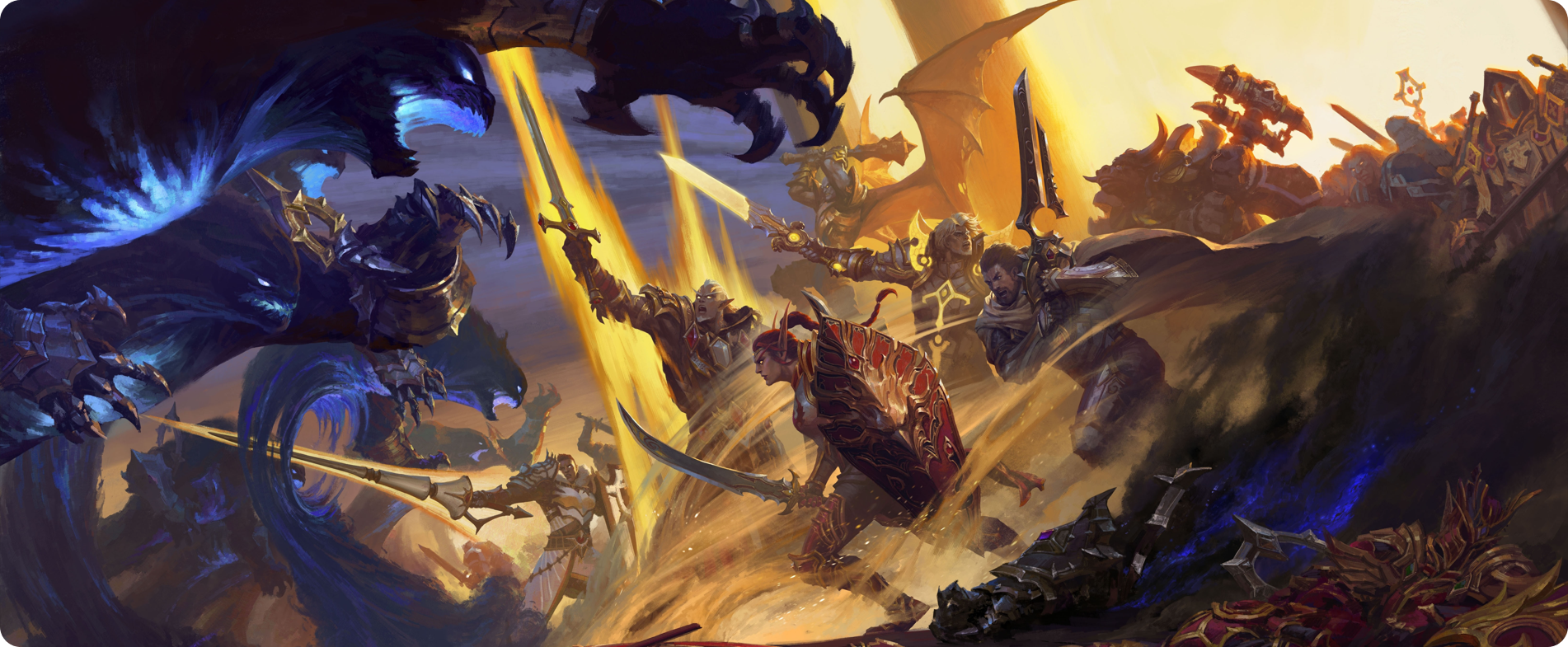
Every class undergoes significant changes in the Midnight Prepatch. This includes extensive tuning, ability updates, and even some redesigns drawn from the Midnight alpha/beta. The big “feel” shift is that a lot of specs will come out the other side leaner and more intentional: some buttons get pruned, some effects get consolidated, and parts of your kit get sharpened into clearer roles.
In other words, when you log in on patch day, many classes won’t just hit different numerically — they’ll feel different in the hands, because the game is actively steering rotations and utility toward a cleaner baseline. In fact, Rogues have been overhauled from the ground up — Blizzard highlighted Rogue as “reworked” among the main Midnight features — and that’s a useful mental model for what’s happening across the board: not every spec is rebuilt, but nearly every spec is touched.
Most classes gain access to new Hero Talent structures and Apex Talents at the end of each spec tree, representing powerful capstone traits that push your build toward a more defined fantasy. The key here is that the pre-patch is doing the setup work: your talent UI updates, your trees get reorganized, and the new endpoints are visible so you can start planning around them — but you won’t have the full set of new power immediately. Midnight adds 10 additional talent points that are earned through Midnight leveling, so at the current cap you should expect some choices to feel like “scaffolding is in place, but the top floor isn’t finished yet.” As a result, your talent build will likely reset on patch day, and some specs may feel slightly incomplete until the expansion leveling path delivers the remaining points. Don’t panic; that awkward in-between phase is normal for a pre-patch. Treat it like a live-fire rehearsal: your job is to re-lock your baseline build, test the new flow, and identify which new nodes you’ll be aiming for once the expansion actually starts handing out the rest of the points.
Beyond talents, expect myriad balance changes — the kind that quietly changes pacing, punish windows, and the value of good execution. Interrupt abilities have a longer lockout across the board in PvE (e.g. Kick and Pummel now interrupt for 5–6 seconds, up from 3), making interrupts more rewarding and meaningfully increasing the “cost” of letting a cast through. Practically, this shifts responsibility: fewer frantic, spammy kicks, more deliberate coverage. If your group has been used to sloppy overlap, you’ll notice the difference fast — longer lockouts make good interrupt discipline feel powerful, and bad discipline feel expensive.
Tank taunts now force higher threat and last a minimum of 6 seconds by default, to help tanks hold aggro and stabilize messy pulls. The diminishing returns (DR) system for crowd control has been revamped: in PvP, repeated CC of the same category now makes the target immune after the second application (instead of the third). This should reduce how oppressive chain-stuns and other CC can be in arenas, and it nudges PvP away from “perma-lock” scripts and toward cleaner setups with clearer endings. Taken together with the pruning, the direction is consistent: fewer layers of hidden control, more readable combat states, and a bigger reward for correct timing instead of raw UI automation or endless micro-stacking.
All told, Blizzard’s goal is to make combat more readable and less “stunlock-y,” especially in PvP — and it is worth taking seriously: your class may feel noticeably different the moment you log in. Every spec has dozens of specific tweaks (new or removed talents, damage tuning, utility reshuffles, rotational smoothing), so once the patch hits you’ll want to consult updated class guides and the official patch notes for your spec to refine your build. The takeaway is that Midnight pre-patch changes the meta: even your muscle memory may need adjustment for the new rotations, because pruning doesn’t just remove buttons — it changes what you prioritize and when you can afford to make mistakes. Spend some time on target dummies or low-stakes content to get a feel for your class’s revised flow, check your keybinds and macros for dead abilities, and then rebuild your “default” build with intention rather than nostalgia. The faster you normalize the new baseline during pre-patch, the less chaotic launch week will feel when the full talent progression finally clicks into place.
Transmog enthusiasts, rejoice — the pre-patch brings massive improvements to WoW’s appearance system, and it’s the kind of quality-of-life change you feel immediately. The core idea is simple: your look stops being “tied to an item” and starts being “tied to you”. That means fewer vendor runs, fewer annoying re-mogs after upgrades, and far more freedom to treat cosmetics like a real collection system instead of constant maintenance.
First, transmogs are now applied per gear slot rather than per item. In practical terms, this means you won’t lose your transmog look when you equip new gear. Once you’ve styled a given slot (head, chest, etc.), that appearance stays on until you manually change it, regardless of item swaps. This finally frees us from rushing back to a transmog NPC every time we get an upgrade mid-raid — your new loot inherits the look you already set for that slot, so your character stays visually consistent while you gear up.
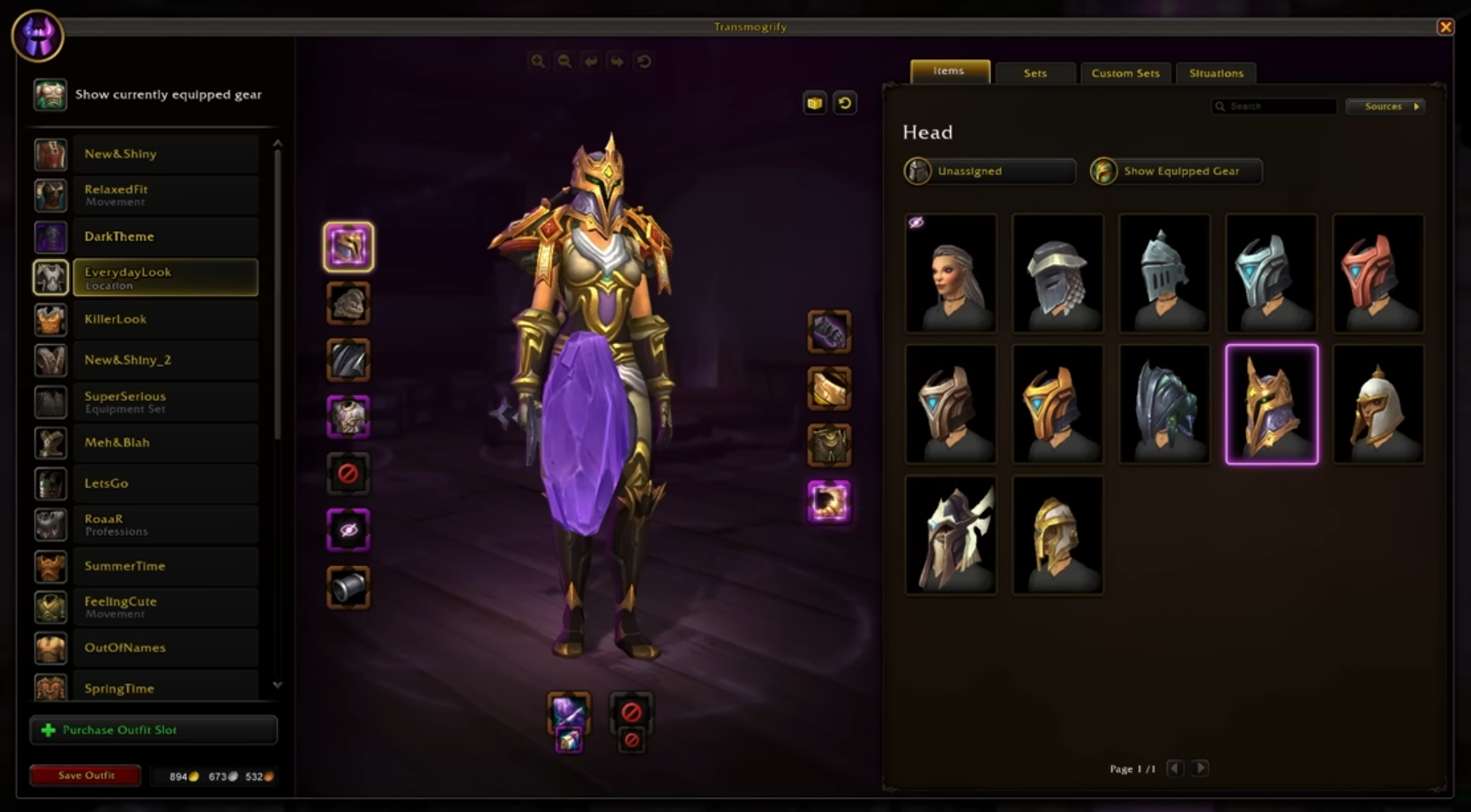
Second, class set collecting gets a major “collection backfill” upgrade that’s going to shower a lot of players with appearances on patch day. Fully collecting a class set’s appearances on a higher difficulty will unlock the lower difficulty variants automatically. In other words: if you complete Mythic, you also get Heroic, Normal, and Raid Finder for that eligible set; if you complete Heroic, you get Normal and Raid Finder; and so on. The key word is fully — single pieces won’t cascade unlocks by themselves, and only sets marked as eligible in the collection UI participate. The change is retroactive for legacy content, so if you already completed older tier appearances, you may log in and immediately see a wave of newly unlocked variants. Also worth noting: items won’t “morph” into different visual tiers when upgraded anymore, so your appearance tracking becomes cleaner and more predictable.
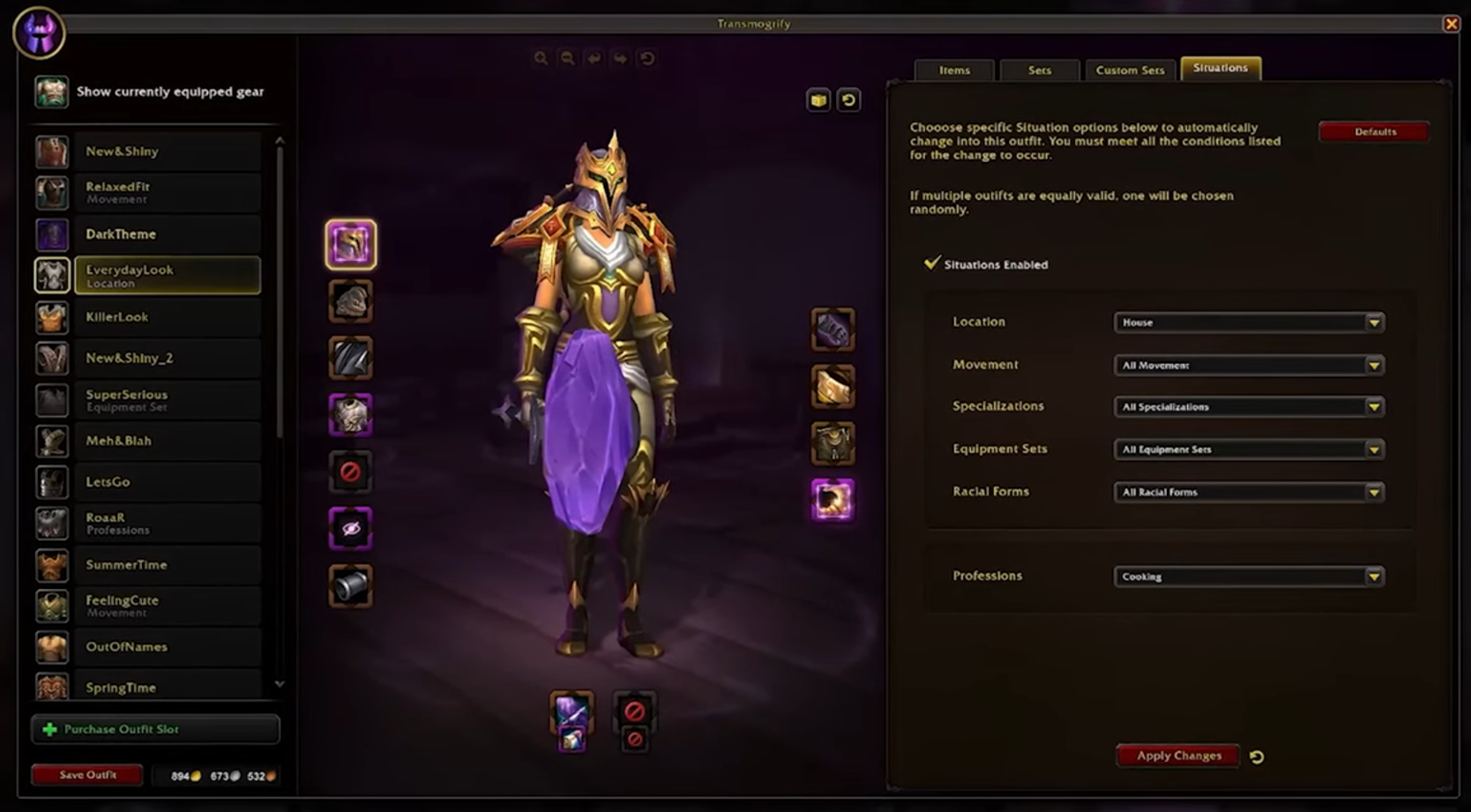
Third, Blizzard is introducing a more modern saved-look system built around Outfits (sometimes also referred to as Outfit Slots). An Outfit is a saved transmog ensemble you can apply in one go. Players start with 2 Outfit slots for free, and can purchase additional slots with gold. The overall theme is “dozens of slots”, with the exact cap and total gold cost having shifted across builds and tuning passes — up to 50 purchasable slots and a total price that can climb to roughly 2,000,000 gold if you insist on maxing everything out. The important practical takeaway is this: you probably don’t need anywhere near the cap. Most players will be perfectly covered with a handful of slots (raid, dungeon, PvP, city, RP, a meme set, and maybe a seasonal “main character” look).
The real game-changer is that you can switch outfits anytime, anywhere — even in the field — and you can put outfits on your action bar for instant swapping. Switching between your already-saved outfits is free; the gold cost shows up when you edit an outfit’s appearance. Updating the look inside an outfit can run around ~1,500–2,000 gold for a full set, which means your spending becomes more “one-time cost when you redesign a look,” not “constant nickel-and-diming every time you equip a better helm”. If you’re the type who upgrades gear frequently (especially early in a season), this system should feel cleaner and, over time, potentially cheaper than the old habit of repeatedly re-mogging individual pieces.
Fourth, a new Situations feature allows automatic outfit swaps based on what you’re doing, where you are, and how your character is currently presented. Situations triggers with your current content type (dungeons, raids, PvP), location/resting areas, movement states (including swimming and mount travel), specialization swaps (including custom spec profiles!), and even racial forms for shapeshifting presentation cases like Worgen and Dracthyr. The best part is that Situations can be combined — so you can get as granular as “my swimming set, but only when I’m in a dungeon” or “my city set, but only on my crafting spec” without having to think about it. This is the transmog system finally behaving like a modern loadout manager: you define the rules once, then the game handles the wardrobe swaps for you.
There are a few smaller transmog-adjacent upgrades worth calling out because they’re exactly the kind of niche win that becomes someone’s entire personality for a week. One example mentioned in the notes is Fury Warriors: they can now transmogrify their two-handed weapons to use one-handed weapon appearances. That’s a pure fantasy win — as it’s not about power, it’s about letting the character look the way the player imagines them!
Finally, the collection UI itself is getting smarter. The set interface has been updated to better communicate what you have, what you’re missing, and what is eligible for the new “lower-tier unlock” behavior. The Sets tab now surfaces incomplete sets (not just finished ones), and your older saved sets from the previous UI are preserved under a Custom Set area so you don’t lose your fashion history when the system modernizes.
Between permanent slot mogs, Outfit presets, Situation rules, and retroactive set unlocks, transmog is finally catching up to what players have wanted for years: less busywork, more collecting, and a wardrobe that behaves like a wardrobe. If you care about appearances at all, this is a patch where logging in on day one can genuinely pay off — especially if you’ve already completed high-difficulty tier sets and are about to get a cascade of “free” lower variants.
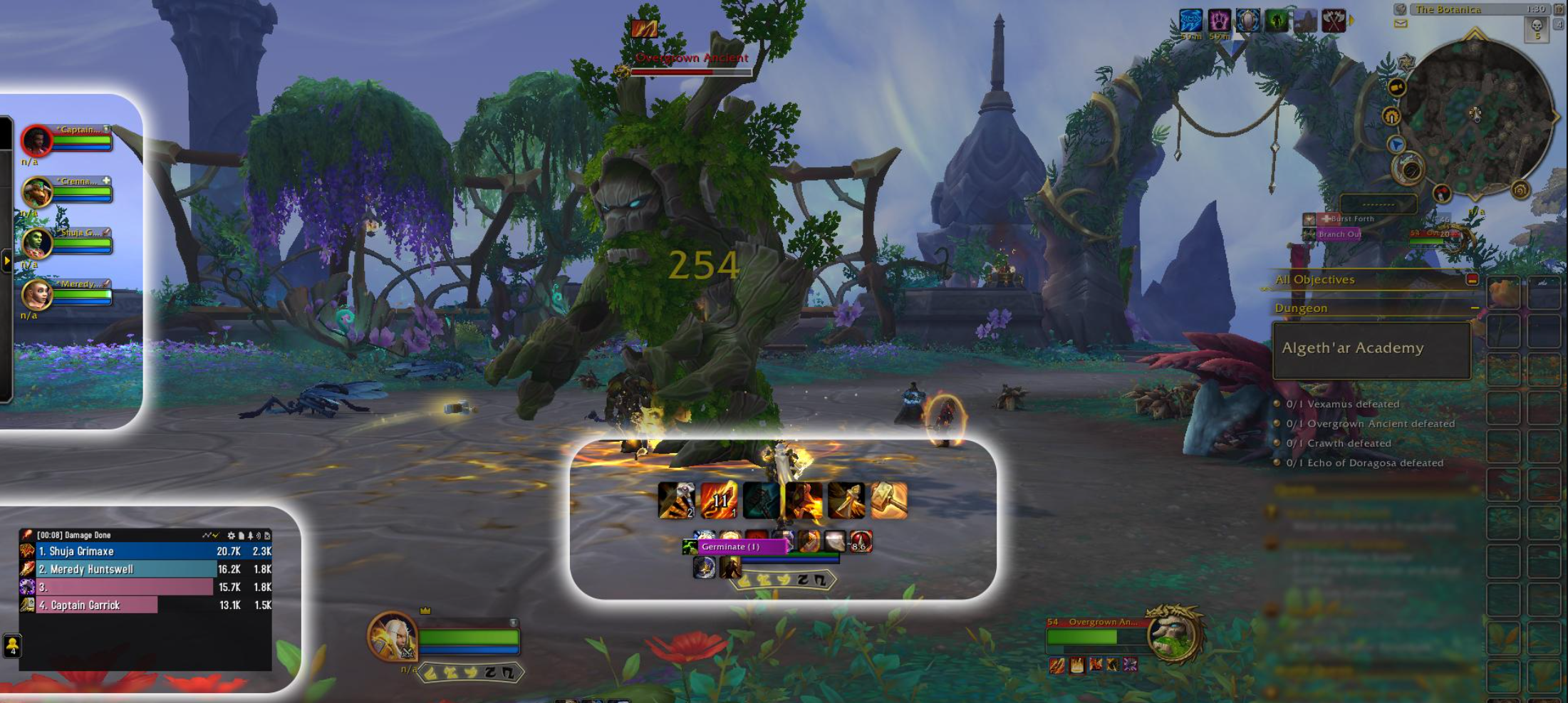
Blizzard has undertaken a sweeping UI overhaul for Midnight, integrating many features that previously required popular addons. The philosophy is blunt: the default UI should be capable enough that “baseline competitive clarity” is built-in, not rented from third-party tools. Some of these changes are big headline features, others are small quality-of-life switches — but together they add up to a pre-patch that quietly rewires how you process combat information.
Here are some of the biggest UI updates in the pre-patch:
Overall, the UI changes aim to give players the data and cues they need without depending on the addon arms race. Edit Mode becomes the real “build your cockpit” layer: once you invest time into positioning these new elements, a stock UI can be far more viable for serious play than it has ever been. And importantly, many of these features aren’t just convenience — they’re the foundation that makes the addon restrictions survivable without turning the game into a blindfolded reaction test.
Hand-in-hand with the UI upgrade comes the controversial shift that changes the culture of high-end WoW: Blizzard is narrowing what combat addons are allowed to do in Midnight. The headline is not “addons are removed” — they aren’t — but the rules of the sandbox are being rewritten. The stated focus is limiting automation and “competitive advantage” behavior, so the default UI becomes the primary source of combat-critical information rather than a platform for infinite custom overlays.
In practice, these are wide-reaching changes to what UI addons can access and how they can behave in combat. Combat scripting, combat automation, and certain kinds of informational “cheats” (where addons infer or expose things Blizzard doesn’t want surfaced) are being squeezed out. The goal isn’t to kill customization entirely, it’s to prevent addons from becoming co-pilots that play the encounter for you. That means some of the most iconic tools in modern WoW will either shrink, pivot, or break outright depending on how dependent they were on restricted data.
Two practical consequences matter for regular players more than any philosophical argument:
The WeakAuras team has indicated they do not plan to release a Midnight-compatible version under the new restrictions, because too much of the data that made WA powerful (reliable tracking for many triggers) is no longer available in the same way. Whether that stance changes depends on how Blizzard iterates on the restrictions after feedback.
What does this mean for you on pre-patch day? If your setup is heavily dependent on custom WeakAura packages, complex nameplate scripts, or advanced combat tracking, you should expect a rough re-learning phase:
Blizzard’s bet is that fewer addon crutches will make combat more readable, onboarding less brutal, and competitive play less dependent on UI engineering. Critics are right to worry about edge cases — high-end players will always want more clarity than the base UI provides. But the difference this time is that Blizzard is shipping a real replacement stack, not just taking tools away.

Finally, it’s worth highlighting a few miscellaneous changes coming with the pre-patch:
Stat and Item Level Squish: Midnight brings a major stat squish to curtail the massive power bloat of prior expansions. All item levels and numeric values are being compressed down. For perspective, endgame TWW gear around item level 700+ Mythic under the old 11.2 upgrade system will become roughly item level 100 after the squish. Player health, damage, and old content numbers are likewise squished by a huge factor. The intent is purely to reduce number sizes, making them more readable, without actually nerfing your relative power. Blizzard stated, “Numbers across the game are being reduced... your power level relative to enemies will remain the same, there will simply be more relatable numbers on your screen.” In theory, a squish shouldn’t affect your ability to solo old raids or defeat current bosses, but be aware there may be some tuning hiccups.
New PvP Tutorial Mode — Training Grounds: To help players learn battleground basics, the patch introduces PvP Training Grounds — essentially co-operative battlegrounds against AI opponents. You can queue up (solo or with friends) for training versions of Arathi Basin, Silvershard Mines, and Battle for Gilneas, where your team will face off against computer-controlled enemy teams. The enemy AI has been tuned to simulate real players reasonably well — they take objectives, fight back, and won’t just roll over (though they are easier to beat than skilled humans, obviously). The idea is that new PvP’ers can practice strategies and get comfortable with maps without the pressure of real PvP. Victories (and occasional losses) here will build your confidence and understanding of how battleground objectives work. It’s a welcome addition for those who find jumping straight into PvP intimidating. Note that this mode is primarily for learning; it doesn’t provide high-end rewards, and honor gains are modest.
Miscellaneous: A few other points of interest — Time Rifts and Turbulent Timeways (time-travel events from Dragonflight) are wrapping up, and any related rewards become legacy. The Mage Tower will scale to the new level/item numbers. Cross-Faction Guilds continue as in 10.2.7, with further improvements to the guild interface (now showing faction tags). Also, Legacy Loot rules are expected to update so that Shadowlands raids fall fully under legacy mode (free-for-all personal loot) once we’re in the Midnight pre-patch era — good news for mount and mog farmers!
Midnight’s pre-patch is basically the moment the game exhales and then tightens its grip — classes shift, systems click into their new shape, the UI gets smarter, and the event gives you something concrete to chase while everyone relearns their buttons.
Treat it like a warm-up lap, not a lecture: poke the new Demon Hunters stuff if it’s your thing, rebuild your talents without overthinking it, and get comfortable with the new on-screen cues before it actually matters. Grab the rewards you care about, ignore the rest, and spend a little time feeling out the new rhythm. When Midnight finally drops, you won’t be scrambling — you’ll already be moving like the expansion has been live for weeks.